


Käyttöopas
Asiakirja

Asiakirjan välilehden avulla voit muuttaa kunkin laulun asiakirja-asetuksia, kuten pimän valon tilaa, värisävyä, kirjasinta, paperin kokoa ja marginaaleja.
Kun katselet tuotua tiedostoa, kuten PDF-tiedostoa, jota voidaan värjätä, tämä välilehti näyttää vain Värisävyn tila.
Asetukset
Voit napauttaa ylävasemmalla olevaa jakoavaimen kuvaketta muuttaaksesi järjestelmän globaaleja asetuksia tälle valikkolle. Tämä ei vaikuta yksittäisen laulun muotoiluun.
Värisävyn tila
Tila määrää värit, joilla laulu piirretään näytölle, ja sitä voidaan käyttää näytön näkyvyyden parantamiseen eri ympäristöissä tai käyttäjille, joilla on visuaalisen stressin häiriöitä. Tilat muuttuvat vastaavasti pimän valon tilaan. Jos mitään vaihtoehtoa ei ole valittu, OnSong näyttää laulun oletusasetuksilla. Vaihtoehdot ovat:
- Paperi näyttää laulun suurella kontrastilla mustana ja valkoisena.
- Himmeä näyttää samankaltaisesti kuin paperi, mutta pienemmällä kontrastilla.
- Seepia näyttää samankaltaisesti kuin himmeä, mutta lämmittyneillä värisävyillä.
- Taivas näyttää laulun asettamalla sinisen värisävyn päälle auttaakseen visuaalisen stressin häiriöissä.
Pimän valon tila
Tilapainikkeista oikealla puolella on kuvake, jota voit käyttää pimän valon tilan vaihtamiseen. Tämä asetetaan järjestelmän laajuisesti, kun se kytketään päälle, ja huomaat, että se soveltaa nämä muutokset myös valitsemaamme tilaan. Tämä vaikuttaa kaikkiin OnSongin lauluihin ja valikkoihin.
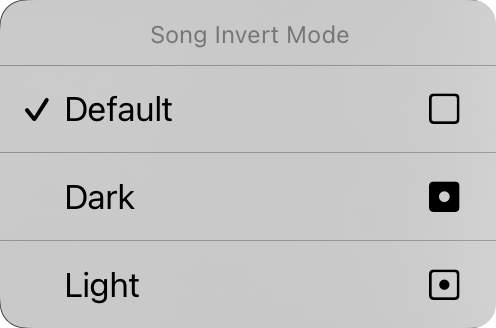
Voit myös napauttaa ja pitää pimän valon painiketta painettuna avataksesi laulun inversion tilan kontekstivalikon. Täältä voit muuttaa pimän valon tilaa tietylle asiakirjalle. Tämä on oletusarvoisesti asetettu "oletukseen", mikä tarkoittaa, että lauluasiakirja osallistuu pimän valon tilaan, kun se muuttuu järjestelmässä. Voit pakottaa lauluasiakirjan näkymään joko tummalla tai vaalealla tilalla tässä riippumatta sovellukselle asetetusta pimän valon tilasta.
Kirjasimen perhe
Viisi painiketta valikon yläosassa antavat sinulle mahdollisuuden valita koko laulun kirjasimen. Voit valita:
- Sans-Serif on kirjasin, kuten Helvetica, joka on täydellinen sointusävelkaavioiden näyttämiseen. Oletusarvo.
- Serif on kirjasin, kuten Georgia, joka voi olla helpompi lukea joillekin käyttäjille.
- Handwritten on kirjasin, kuten Marker, joka on hyvin kapea, jolloin enemmän sisältöä mahtuu sivulle.
- Monospaced on kiinteän leveyden omaava kirjasin, kuten Courier, joka on hyödyllinen joissakin tapauksissa sointujen tasauksessa.
- Mukautettu avaa Mukautetun kirjasimen listan, jossa voit selata laitteellesi asennettuja kirjasimia ja valita yhden. Neljä yllä mainittua kirjasinta ei toisteta tässä luettelossa. Valitse Oletusarvo tyhjentääksesi mukautetun kirjasimen. Joka kerta kun valitset tämän vaihtoehdon, Mukautetun kirjasimen näyttö tulee näkyviin uudelleen valintaa varten.
Rivien väli
Kun haluat sovittaa enemmän näytölle, harkitse rivien välin eli rivien välisen tilan pienentämistä. Voit myös lisätä rivien väliä enemmän tilaa rivien välille paremman näkyvyyden vuoksi. Voit napauttaa kaikki liukusäätimet vasemmalla ja oikealla olevia kuvakkeita hienosäätöä varten. Säätö välillä 0,7 ja 1,3 riviä. Oletusarvo on 1,0.
Jos laululla on piirustuksia, voit napauttaa ja pitää Rivien väli painettuna avataksesi Piirustuksen tasaus. Valitse Tasaa piirustus perintöpohjaiseen rivien väliin tai Tasaa piirustus nykyiseen rivien väliin rivillä piirustus takaisin lyriikojen kanssa.
Paperi
Tämän avulla voit asettaa virtuaalisen sivun koon, mikä vaikuttaa valitsemiesi kirjasimien kokoon. Esimerkiksi suuremmat paperikoot näyttävät kirjasimia pienemmällä koolla. Koot sisältävät Letter, Folio, Legal, Tabloid, A5, A4, A3 ja A2. Oikeanpuoleiset kuvakkeet antavat sinulle mahdollisuuden valita pysty- tai vaakaasennolle.
Asettelu
Asettelukappale antaa sinulle mahdollisuuden määritellä, kuinka kunkin asiakirjan sivu tulostuu, kun käytät R2-renderöintimoottoria. Sivun katkaisujen tai kahden sarakkeen valitseminen ottaa R2-renderöintimoottorin käyttöön lauluille, jos se ei ole jo käytössä. Tässä on kolme hallintaa:
Sivutus
Tämän avulla voit valita, virtaatko kaavion alas sivulle jatkuvalla vierityslehdelä tai jaatko sivun virtuaalisen paperin arkeiksi.
Sarakkeet
Tämän hallinnon avulla voit valita yhden tai kahden sarakkeen välillä. Kun kaksi saraketta on otettu käyttöön, laulun osiot virtaavat arkin toiselle puolelle.
Väli
Tämä on välin, sarakkeiden välisen tilan, leveys. Vaihtoehdot sisältävät 0" - 1" 1/16" väliajoin.
Marginaalit
Marginaalien avulla voit lisätä sisennyksen virtuaalisen paperin reunoille näytöllä. Tämä on hyödyllinen tekemään teksti näkyväksi ja tarjoamalla tilaa kuumille kulmille tai navigointivyöhykkeille kun käytät myös osan valintaa. Oikeanpuolella oleva kuvake näyttää, kun marginaalia muutetaan: vasen, oikea, yläosa tai alaosa.
Alatunniste
Tämän avulla voit asettaa jalkan koon lyriikan kirjasimen koon prosentteina. Voit myös käyttää oikealla olevaa painiketta alatunnisteen päälle/pois kytkemiseen.
Kaikki tämän välilehden ohjaimet paitsi pimän valon tila koskevat valitun laulun osaa. Näemme pian, kuinka soveltaa tekemiämme muutoksia kirjastomme eri lauluihin.
Jos laululla on piirustuksia, ensimmäinen muutos, jonka teet sen asetteluun, näyttää Laululla on piirustuksia -kehotuksen, koska piirustukset pysyvät siinä, missä ne tehtiin, kun taas lyriikat voivat liikkua. Napauta Säilytä muutokset jatkaaksesi tai Kumoa muutokset palauttaaksesi asettelun entiseen tilaan.
Voit muuttaa kunkin asiakirjan osan oletusarvoja napauttamalla ylävasemmalla olevaa jakoavaimen kuvaketta päästäksesi Tyylin asetukset - asiakirja -vaihtoehtoihin.


