


User Manual
Actions Menu
0:00
 Th' actions menu be lettin' ye pick an action t' perform when pressin' a foot pedal or tappin' on th' screen, savvy?
None
Set th' action t' None t' perform no action when th' input be received.
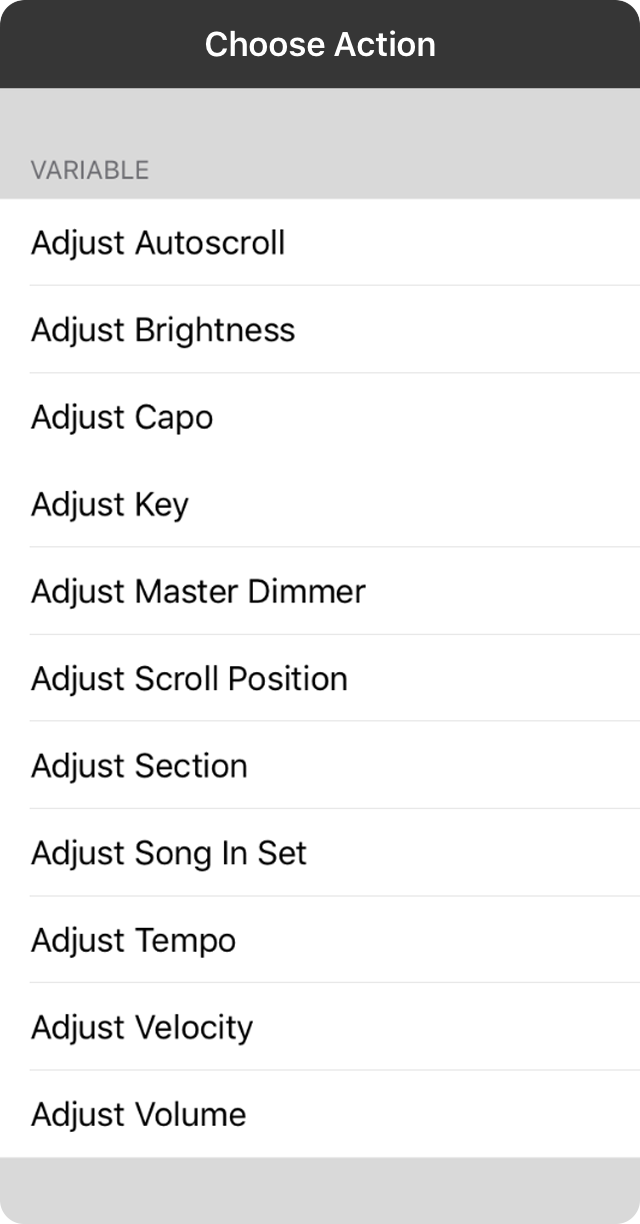
Variable
Variable actions be performed when a variable input such as a MIDI controller knob or expression pedal be used. This be usin' a control change value or note velocity as input t' th' action. Values may appear on th' screen but not take place until th' variable input has not changed fer a brief period o' time.
- Adjust Autoscroll continuously alters th' autoscroll speed from between 0 and 15 minutes.
- Adjust Brightness continuously adjusts th' brightness o' th' screen from between 0 and 100 percent.
- Adjust Capo continuously adjusts th' capo settin' from between 0 and 11 frets.
- Adjust Key continuously changes th' key usin' th' values in th' transpose slider in th' Styles Preferences Menu.
- Adjust Master Dimmer continuously changes th' master dimmer applied t' lightin' in Scenes.
- Adjust Scroll Position continuously adjusts th' scroll position o' th' page from th' top t' th' bottom.
- Adjust Section continuously adjusts th' currently selected section from th' top-most section t' th' bottom.
- Adjust Song In Set continuously scrolls through songs in th' currently selected set.
- Adjust Tempo continuously adjusts th' tempo o' th' song from between minimum and maximum tempos as defined in settin's.
- Adjust Velocity continuously adjusts th' velocity t' use when playin' MIDI notes through OnSong.
- Adjust Volume continuously adjusts th' volume o' th' device between 0 and 100%.

Momentary
Momentary actions be ones that be performed with a single input such as a tap or pedal press. These include:
- Capo Up increases th' capo fer th' song by one fret.
- Capo Down decreases th' capo fer th' song by one fret.
- Scroll Up scrolls th' song up. If usin' a foot pedal, performin' this action once th' top o' a song be reached will navigate t' th' previous song in th' set.
- Scroll Down scrolls th' song down. If usin' a foot pedal, performin' this action once th' bottom o' a song be reached will navigate t' th' next song in th' set.
- Next Song navigates t' th' next song in th' set.
- Previous Song navigates t' th' previous song in th' set.
- Random Song loads a random song from th' currently selected book or set. Use fer practicin' songs in yer library without a pattern.
- Reset Song scrolls th' current song t' th' top and optionally resets toggled events such as autoscroll, backin' tracks, th' metronome and section assignments. These can be customized in Settings » Navigation Settings » Actions » Reset Song.
- Next Slide advances t' th' next slide when projectin' lyrics.
- Previous Slide advances t' th' previous slide when projectin' lyrics.
- Next Timeline Event will advanced t' th' next event as recorded or specified in th' Timeline.
- Previous Timeline Event will go t' th' previous event as recorded or specified in th' Timeline.
- Show/Hide Menubar toggles th' menubar on and off fer a full screen view.
- Show Quick Pick displays th' Quick Pick screen fer quickly searchin' and loadin' songs.
- Show Songs List shows and hides th' song menu.
- Scroll Faster decreases th' duration o' th' song by 30 seconds which causes autoscroll t' speed up.
- Scroll Slower increases th' duration o' th' song by 30 seconds which causes th' autoscroll t' slow down.
- Start Audio will start playin' a backin' track assigned t' th' currently viewed song.
- Start Autoscroll will begin autoscrollin' th' current song.
- Start Metronome will start th' metronome t' th' tempo assigned t' th' currently viewed song.
- Stop Audio will stop th' audio track if one be playin'.
- Stop Autoscroll will pause autoscroll whether linear or in a non-linear timeline.
- Stop Metronome will stop th' metronome.
- Toggle Audio play, pause, or stop th' backin' track associated t' th' song.
- Toggle Autoscroll starts or pauses th' autoscroll.
- Toggle Capo turns th' capo on or off.
- Toggle Low Light Mode turns low light mode on and off. When on, th' background o' th' song be black with white foreground text.
- Toggle Metronome turns th' metronome on and off.
- Toggle MIDI Clock starts or stops sendin' MIDI clock events used t' synchronize tempo between MIDI devices.
- Toggle MIDI Start/Stop sends th' MIDI start or stop command.
- Toggle Transpose will turn th' transposition engine on and off.
- Mute Metronome mutes th' metronome, allowin' it t' continue t' keep time and optionally blink th' menubar. This be great t' use fer practice t' see if th' beat can be maintained without click reinforcement.
- Tap For Tempo be used t' change th' tempo o' th' current song. This should not be used on high latency foot pedals like th' AirTurn BT-105 since they be designed t' forgive accidental foot taps or double entry.
- Tempo Up increase th' tempo o' th' song by 1 BPM.
- Tempo Down decreases th' tempo o' th' song by 1 BPM.
- Transpose Up transposes th' song up by one half step includin' enharmonic variations.
- Transpose Down transposes th' song up down one half step includin' enharmonic variations.
- Volume Up increases th' master volume o' th' device by a sixteenth.
- Volume Down decreases th' master volume o' th' device by a sixteenth.
- Blackout Lyrics blacks out th' lyrics fer lyrics projection by hidin' lyrics and removin' th' background.
- Clear Lyrics shows or hides th' lyrics durin' lyrics projection while retainin' th' background image or video.
- Continue Scene will continue th' playback o' a scene if a step be encountered that has an infinite duration. Use this fer more advanced playback without th' creation o' addition scenes.
- Play Scene be used t' restart playback o' th' currently loaded scene.
- Stop Scene be used t' stop th' playback o' th' currently playin' scene.
- Toggle Scene Playback can be used t' toggle th' playback state o' th' currently loaded scene.
- Playback Pitch plays th' pitch o' th' song fer a cappella groups. This can be configured usin' metadata.
- Shift Up shifts t' th' next gear in th' configured gears.
- Shift Down shifts t' th' previous gear in th' configured gears.
- Unshift shifts t' th' first gear in th' configured gears.
- Send Message allows ye t' select a message t' be sent t' connected devices.
- Send MIDI when usin' th' MIDI in-app purchase, this option be available and allows ye t' define a MIDI command t' be sent.
- Switch Scene can map a specific scene t' an action. Fer instance, set an action t' blackout all lights or t' bring th' house lights up.
- Switch Section allows ye t' link an action directly t' a named section in yer song. Fer instance, ye can link t' "Verse 1" or "Chorus".
- Switch Song allows ye t' switch t' a particular song in yer library when triggered.
OnSong 2026 — Last Updated on September 20, 2023


